










Optimize Messages Mid-Campaign
Test up to five messages at a time, and only send messages that reach your target CTR.

Test up to five messages at a time, and only send messages that reach your target CTR.
Smart Send is a suite of no-code campaign optimization tools built directly into MessageWhiz. It lets you run up to five message versions simultaneously, set a CTR threshold that a segment must reach before the campaign continues, and schedule delivery across a window of hours, days, or weeks all without writing a line of code or involving your IT team.

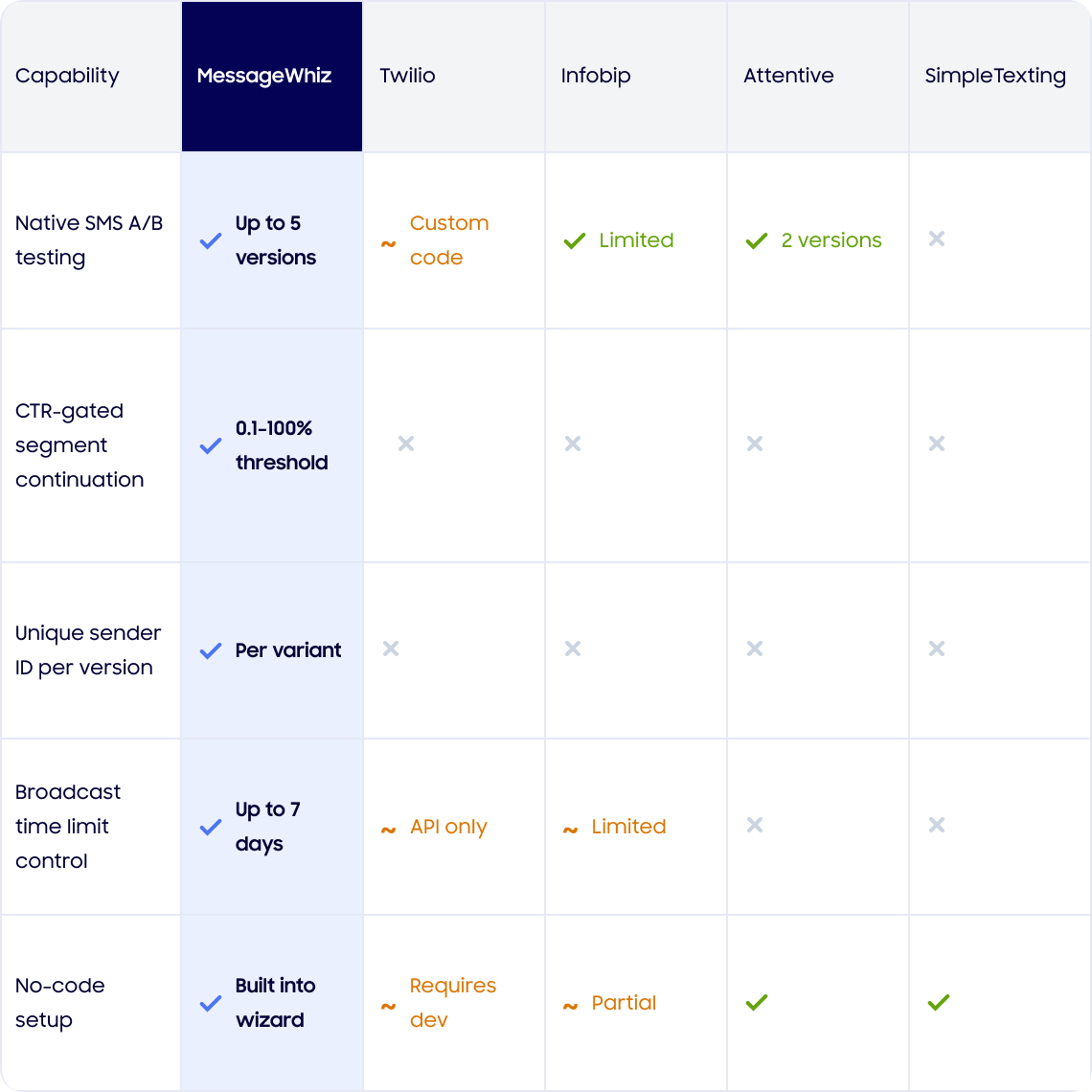


Test offer framing, sender names, and delivery timing across multiple versions. Find what drives the most clicks before you commit your full audience to one message.

Set CTR thresholds to catch messaging that is failing to reconnect with lapsed customers. Pause before a weak message reaches your entire dormant segment, and adjust before continuing.

A/B test welcome copy and sender identity to improve early engagement rates. First impressions are hard to undo. Smart Send helps you get them right before the full sequence runs.

Use delivery scheduling to spread a flash sale or limited-time offer across a defined window. Reach your audience at the right time, on the right channel, without manual coordination.
Real campaigns. Real results. Here’s how teams are using Smart Send’s threshold controls and multi-version testing to protect their audience and improve performance before a single underperforming message reaches the full list.
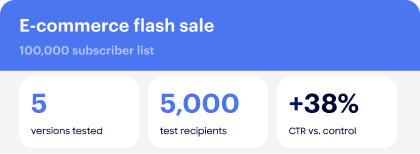
3 of 5 versions didn’t hit the 2.5% CTR threshold and were automatically blocked. The winning offer, “Your exclusive 4-hour sale starts NOW,” was sent to the remaining 95,000 contacts, outperforming the previous broadcast CTR by 38%.
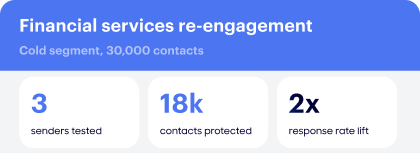
By testing 3 different sender IDs with a 3% CTR gate, 2 versions never reached the cold list. A branded sender dramatically outperformed the numeric shortcode, insight that would have taken weeks to surface otherwise.


Book a short demo and we'll walk you through a live campaign test.
What is Smart Send?
Smart Send is a set of no-code campaign optimization tools built into MMDSmart MessageWhiz. It includes A/B message testing, CTR threshold controls, sender name testing, and built-in delivery scheduling.
How many message versions can I test with Smart Send?
You can test up to five versions of a message simultaneously. Smart Send sends each version to a defined segment of your audience and uses click behavior to identify which performs best.
What is a CTR threshold and how does it work?
A CTR threshold is a minimum click-through rate you define before sending a campaign. If a segment falls below that rate, the campaign pauses automatically, giving you time to review the messaging and make changes before it reaches more of your audience.
What happens when a campaign is paused by a CTR threshold?
The campaign stops at the underperforming segment. You can review the results in the platform and edit your message, sender name, or targeting before choosing to resume or stop the send.
Can I test sender names as well as message content?
Yes. Smart Send’s A/B tools let you test sender names independently or alongside message copy, so you can identify which combination of sender identity and content drives the most opens and clicks.
Does Smart Send require any coding or developer support?
No. Every feature in Smart Send is configured directly in the MessageWhiz platform. No code or developer involvement is needed at any stage.
How does delivery scheduling work in Smart Send?
You can set a delivery window and spread your campaign across hours, days, or up to a week. The platform manages the timing automatically based on the window you define.
How is Smart Send different from standard A/B testing?
Standard A/B testing runs a test and reports the winner after the campaign ends. Smart Send adds an active threshold layer, allowing the campaign can pause mid-send if performance falls below your benchmark, so you can intervene before a weak version reaches your full audience.